The Bricksable Add to Calendar element lets users save events to their preferred calendar in one click—making it easy to boost attendance and never miss important moments.
Content Options
Controls the calendar platform, event information, and button appearance.
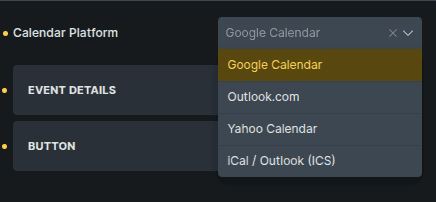
Option | Description |
|---|---|
Calendar Platform | Selects the calendar service used when the button is clicked. |
Event Details
Defines the event information that will be added to the calendar.
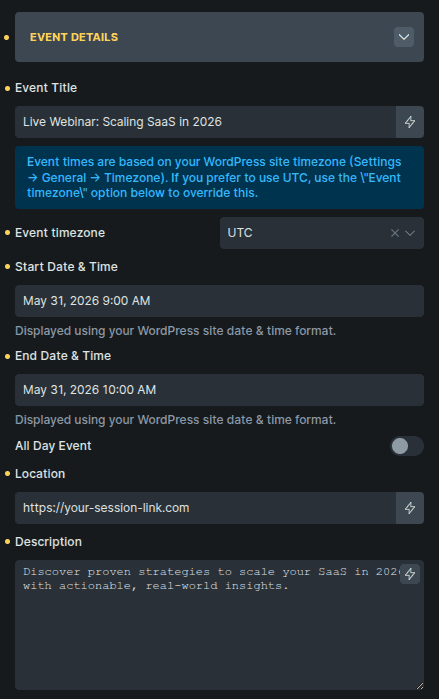
Option | Description |
|---|---|
Event Title | Sets the name of the event. |
Event Timezone | Chooses whether the event uses the site timezone or UTC. |
Start Date & Time | Sets when the event begins. |
End Date & Time | Sets when the event ends. |
Add Day Event | Marks the event as an all-day event. |
Location | Adds the event location. |
Description | Adds extra details about the event. |
Button
Controls the appearance of the calendar button.
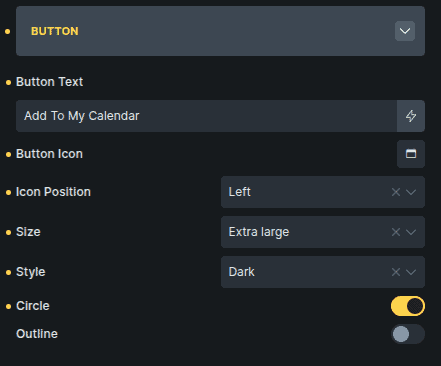
Option | Description |
|---|---|
Button Text | Sets the text shown on the button. |
Icon Position | Places the icon on the left or right side of the button text. |
Size | Controls the button size. |
Style | Sets the button’s visual style. |
Circle | Applies rounded button styling. |
Outline | Displays the button in outline style. |